





九月初買了一塊ESP32的板子和DHT11傳感器,想做個溫濕度監測站,一直放在那裏很久都沒動,前天終於想起來,就用Deepseek寫了下代碼,最後搞起來了,其實還挺簡單的。
首先是配置Arduino。我的老電腦還在運行win7,因此只能安裝Arduino IDE 1.8.19。Arduino IDE 安裝好後需要更新管理庫,安裝Adafruit出品的DHT sensor library,由於電腦CPU太過古老,這一步巨卡無比。接著還要更新ESP32開發板的支持,先是在首選項裏添加以下網址:
Url
https://espressif.github.io/arduino-esp32/package_esp32_index.json然後安裝esp32 by Espressif Systems,win7一定要選擇1.0.6的版本安裝,否則環境不兼容。
支持安裝好後,開發板選擇ESP32 Dev Module,端口根據電腦識別的來設置,比如COM7、COM8。
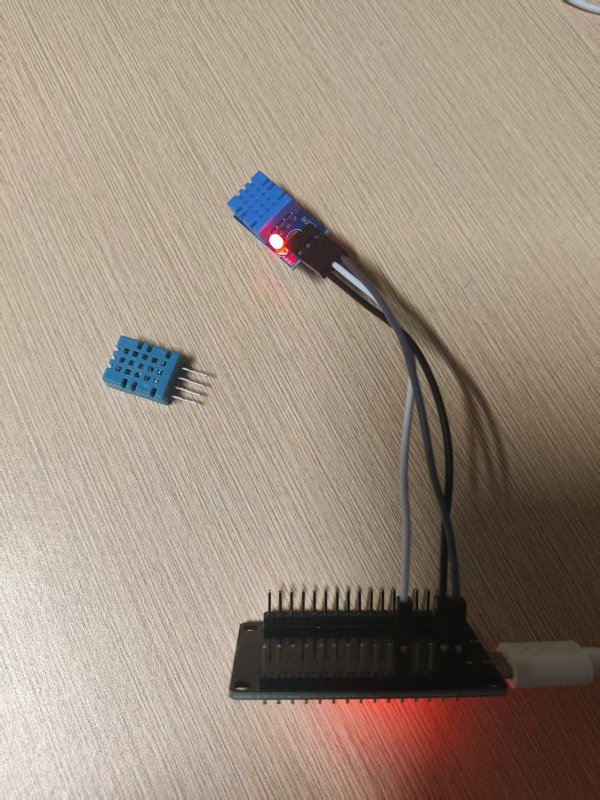
監測站圖片版權歸本站所有
Arduino代碼直接使用Deepseek生成就可以,由於一開始只有單獨的DHT傳感器(圖一左邊那個藍色四針頭的DHT11),必須打開上位電阻。
C++
#include <WiFi.h>
#include <HTTPClient.h>
#include <DHT.h>

// ================= 1. 必須修改的配置區 =================

// ① 你家 WiFi 名稱和密碼(必須是 2.4G 頻段)
const char* ssid = "Test";
const char* password = "12345678";

// ② 你電腦的局域網 IP(用 ipconfig 查到的 IPv4 地址)
// 注意:這裏先假設你的 PHP 文件路徑是 /api.php,後面搭好 PHP 後再改
const char* serverUrl = "http://192.168.43.242:8003/temperature/api.php";

// ③ 你的 DHT11 數據針接的引腳(你接的是 D4,對應 GPIO4)
#define DHTPIN 4
#define DHTTYPE DHT11

// ======================================================

DHT dht(DHTPIN, DHTTYPE);

void setup() {
  Serial.begin(115200);
  delay(1000);

  Serial.println("\n--- ESP32 啟動 ---");

  // 初始化 DHT11
  pinMode(DHTPIN, INPUT_PULLUP); // 開啟內部上拉(你無外接電阻,這行必須有)
  dht.begin();

  // 連接 WiFi
  Serial.print("正在連接 WiFi: ");
  Serial.println(ssid);
  WiFi.begin(ssid, password);

  // 等待 WiFi 連接
  while (WiFi.status() != WL_CONNECTED) {
    delay(500);
    Serial.print(".");
  }

  Serial.println("\n🎉 WiFi 連接成功!");
  Serial.print("ESP32 的 IP 地址是: ");
  Serial.println(WiFi.localIP());
  Serial.println("---------------------------------");
}

void loop() {
  // 1. 讀取溫濕度
  float t = dht.readTemperature();
  float h = dht.readHumidity();

  // 2. 檢查讀取是否失敗
  if (isnan(t) || isnan(h)) {
    Serial.println("❌ DHT11 讀取失敗,請檢查接綫");
    delay(2000);
    return;
  }

  // 3. 串口打印數據(方便你隨時看到當前狀態)
  Serial.printf("當前溫度: %.1f °C, 濕度: %.1f %%\n", t, h);

  // 4. 如果 WiFi 是連著的,就把數據發給電腦
  if (WiFi.status() == WL_CONNECTED) {
    sendToServer(t, h);
  } else {
    Serial.println("⚠️ WiFi 已斷開,嘗試重新連接...");
    WiFi.reconnect();
  }

  // 每 5 秒循環一次
  delay(5000);
}

// 發送數據到 PHP 服務器的函數
void sendToServer(float t, float h) {
  HTTPClient http;

  // 開始連接
  http.begin(serverUrl);
  // 告訴服務器我們發送的是 JSON 格式數據
  http.addHeader("Content-Type", "application/json");

  // 把溫濕度拼接成 JSON 格式,例如:{"temperature":28.5,"humidity":79.0}
  String jsonPayload = "{\"temperature\":" + String(t) + ",\"humidity\":" + String(h) + "}";

  // 發送 POST 請求
  int httpResponseCode = http.POST(jsonPayload);

  // 檢查服務器返回的結果
  if (httpResponseCode > 0) {
    Serial.print("✅ 數據發送成功!服務器返回代碼: ");
    Serial.println(httpResponseCode);
  } else {
    Serial.print("❌ 發送失敗,錯誤代碼: ");
    Serial.println(httpResponseCode);
    // 常見錯誤:-1 表示連不上服務器(檢查IP或防火牆),404 表示路徑不對
  }

  // 關閉連接
  http.end();
}
分別接好VCC、Data、GND三根杜邦綫,比如我是用的是D4,就接D4口。我嫌棄DHT11四針頭太細容易滑動,又買了一個帶電路板的。
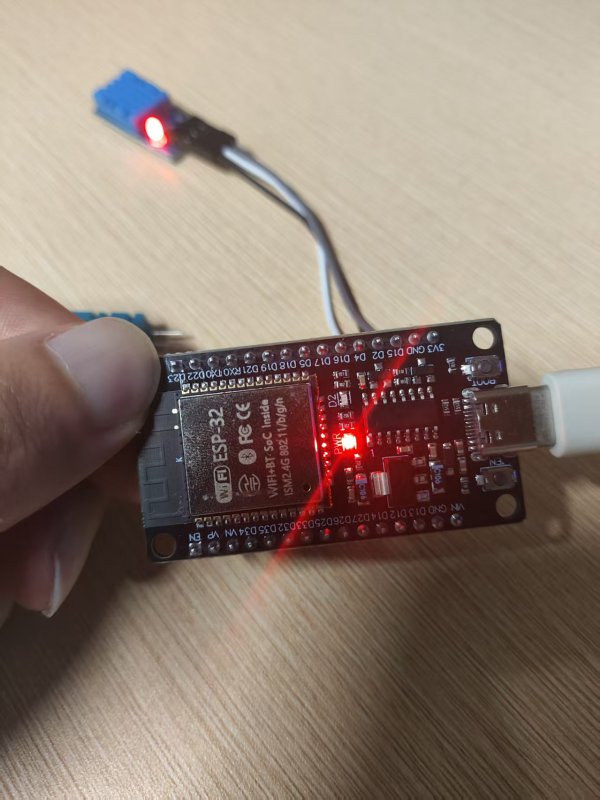
編譯、上傳後,打開串口監視器,選擇115200波特率,就可以正常顯示數據了,這個傳感器反應還是挺靈敏的。
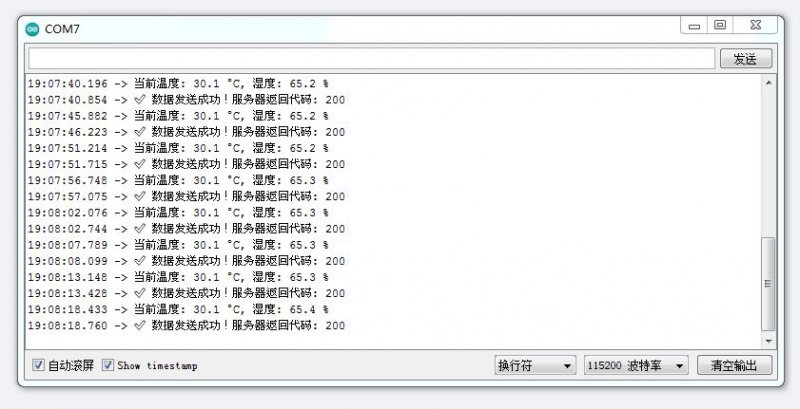
串口監視器圖片版權歸本站所有
生成的數據直接轉化成json傳給api.php,再建一個index.html就可以讀取了數據。
HTML
<!DOCTYPE html>
<html lang="zh-CN">
<head>
    <meta charset="UTF-8">
    <meta name="viewport" content="width=device-width, initial-scale=1.0">
    <title>ESP32 實時溫濕度</title>
    <style>
        body { font-family: 'Microsoft YaHei', sans-serif; background-color: #f0f2f5; text-align: center; padding-top: 50px; }
        .card { background: white; padding: 40px; border-radius: 15px; box-shadow: 0 4px 12px rgba(0,0,0,0.1); display: inline-block; }
        h1 { color: #333; margin-bottom: 30px; }
        .data-box { display: flex; justify-content: center; gap: 40px; margin-bottom: 20px; }
        .item { font-size: 24px; color: #555; }
        .value { font-size: 48px; font-weight: bold; color: #007bff; margin-top: 10px; }
        .time { color: #999; font-size: 14px; margin-top: 20px; }
    </style>
</head>
<body>

    <div class="card">
        <h1>🌡️ ESP32 環境監測站</h1>
        <div class="data-box">
            <div class="item">
                溫度
                <div class="value" id="temperature">-- °C</div>
            </div>
            <div class="item">
                濕度
                <div class="value" id="humidity">-- %</div>
            </div>
        </div>
        <div class="time" id="update-time">等待數據...</div>
    </div>

    <script>
        function fetchData() {
            fetch('data.json?t=' + new Date().getTime())
                .then(response => response.json())
                .then(data => {
                    if (data.temperature !== undefined & data.humidity !== undefined) {
                        document.getElementById('temperature').innerText = data.temperature.toFixed(1) + ' °C';
                        document.getElementById('humidity').innerText = data.humidity.toFixed(1) + ' %';
                        document.getElementById('update-time').innerText = '最後更新: ' + data.update_time;
                    }
                })
                .catch(error => {
                    console.log('暫無數據或讀取失敗', error);
                });
        }

        fetchData();
        setInterval(fetchData, 3000);
    </script>

</body>
</html>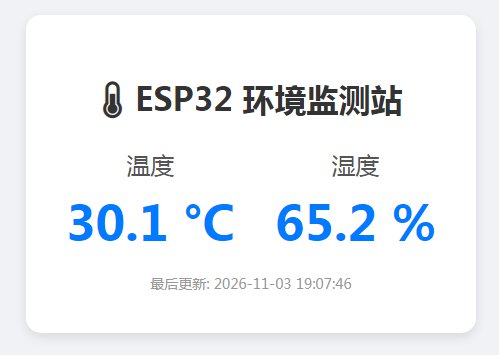
頁面顯示圖片版權歸本站所有